
Around 230 cigars, many wrappers, varieties and shapes: to help you quickly find the right cigar in this range, our cigar category has a detailed filter. This guide shows you step by step how to use it, and says honestly where its limits lie.
To begin with: the information on cigars is inevitably incomplete
Unfortunately, it has become almost normal for manufacturers to name only the country of the wrapper, binder and filler, and no longer the variety. That is a fundamental problem when choosing cigars, because the variety would actually be the far more interesting criterion.
Here is how it looks in our range: for the wrapper we know the variety of almost every cigar. For the binder it is known for a little more than half, for the filler for a good third. The country, by contrast, is almost always known.
The filter takes these gaps seriously. Where a detail is missing, there is the option „Keine Angabe / Not specified“. Without it, cigars with no detail would silently drop out whenever you mark something in that field. With it, you decide whether these cigars should be included. How that works is explained below.
What you can filter
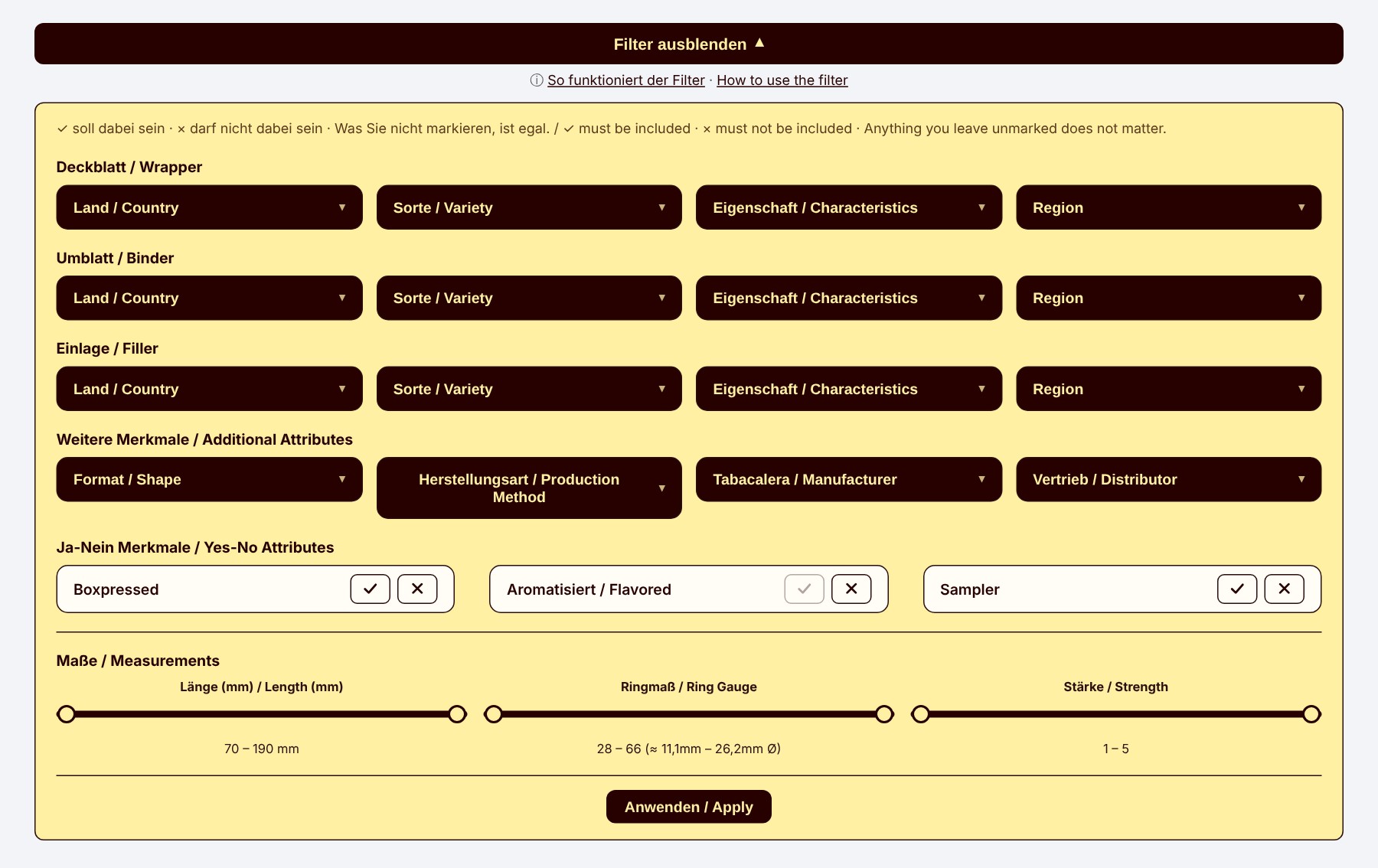
Right above the range you will find the bar „Filter anzeigen“ (Show filters). One click opens the filter.

In the open filter you see, from top to bottom:
- Wrapper, binder and filler (Deckblatt, Umblatt, Einlage): one row each with country, variety, characteristics and region
- Further attributes: shape (e.g. Robusto, Toro, Corona, Piramide), production method (hand-rolled long-fillers, short-fillers and more), Tabacalera (manufacturing plant) and distributor
- Yes-no attributes: Boxpressed, Flavored (Aromatisiert) and Sampler
- Measurements: three sliders for length, ring gauge and strength
- at the very bottom the button „Anwenden / Apply“
All fields can be combined as you like. Are you looking, for example, for a full-bodied, hand-rolled cigar with a Brazilian wrapper? Then mark the matching values, set the sliders if you like and click „Anwenden / Apply“ – done.
One click on a field opens its options, a second click closes them again. There you mark every value with ✓ (must be included) or × (must not be included).
Tick and cross: how to put your cigar together
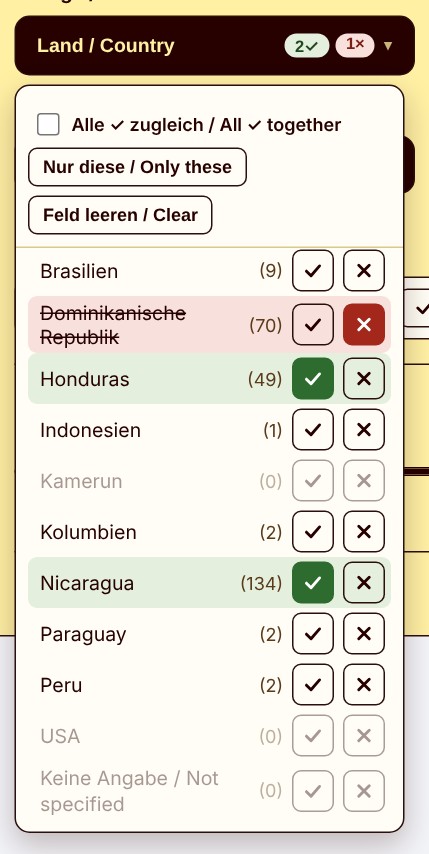
Every value in the selection window has two buttons: ✓ means „must be included“, × means „must not be included“. Whatever you do not mark does not matter to you. A click on the name also sets a ✓, and a second click on a button removes the mark again.
This is how the filter works:
- Several ✓ in the same field: The cigar must have at least one of them. ✓ Nicaragua and ✓ Honduras for the filler shows cigars with filler from Nicaragua or from Honduras.
- ×: Cigars with this value drop out, even if they also have a value you want. ✓ Nicaragua, ✓ Honduras and × Dominikanische Republik shows cigars with filler from Nicaragua or Honduras, but without Dominikanische Republik.
- Values you have not marked: They remain possible. Of the 153 cigars in this example, 8 have, besides Nicaragua or Honduras, a further, unmarked country in the filler, for example Brasilien.
- Several fields: All conditions apply at the same time. ✓ Ecuador for the wrapper country and ✓ Nicaragua for the filler country finds only cigars that meet both.
At the top of the selection window there are three helpers:
- Nur diese / Only these: sets × on all other values of the field. ✓ Nicaragua for the filler and then „Only these“ shows cigars whose filler comes exclusively from Nicaragua. The button is only active after a ✓.
- Alle ✓ zugleich / All ✓ together: exists only where a cigar often has several values: wrapper characteristics as well as filler country, variety and region. Normally one of the ✓ is enough. With this switch all ✓ must apply at the same time.
- Feld leeren / Clear: removes all ✓ and × in this field.
| You are looking for | How to mark | Result (as of October 2026) |
|---|---|---|
| Filler from Nicaragua or Honduras | Filler country: ✓ Nicaragua, ✓ Honduras | 175 cigars |
| … but not from the Dominican Republic | additionally × Dominikanische Republik | 153 cigars |
| Filler exclusively from Nicaragua | ✓ Nicaragua, then „Only these“ | 99 cigars |
| Filler from Nicaragua and Honduras at the same time | ✓ Nicaragua, ✓ Honduras, „All ✓ together“ | 31 cigars |
| A wrapper that is both Maduro and Sun Grown | Wrapper characteristics: ✓ Maduro, ✓ Sun Grown | 76 with one ✓, 22 with „All ✓ together“ |
Countries are listed under their German names, for example Dominikanische Republik for Dominican Republic or Brasilien for Brazil.
In the picture, Nicaragua and Honduras are ticked for the filler, Dominikanische Republik is crossed. Countries for which no cigar is left with this choice are greyed out.
„Not specified“: when the manufacturer stays silent
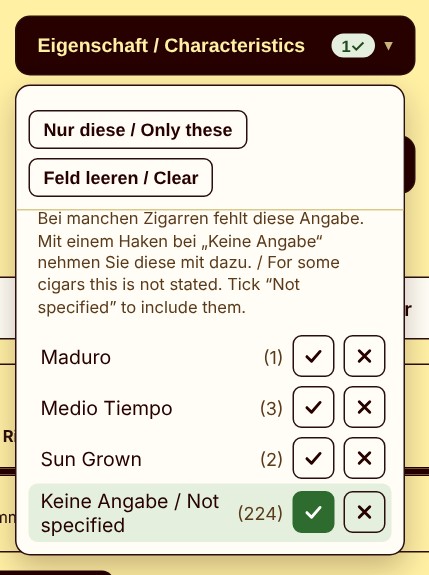
Where a detail is missing for many cigars, for instance the variety of binder and filler or the regions, a short note appears at the top of the selection window. At the end of the list you find the option „Keine Angabe / Not specified“ with the number of cigars affected. For the filler variety that is currently 151 of 230.
It works like any other value, with ✓ or ×. It matters for one reason: as soon as you mark something in a field, cigars without that detail drop out, because we cannot know whether they fit your wish. With „Not specified“ you decide yourself whether these cigars should be included.
Examples for the filler variety (as of October 2026):
- ✓ Corojo: 5 cigars for which Corojo is expressly named.
- ✓ Corojo and ✓ Not specified: 156 cigars, namely these 5 and all for which the variety is not stated.
- × H-2000: 41 cigars for which a variety is named and H-2000 is not among them. H-2000 occurs in 38 cigars, 151 name no variety and are missing here.
- × Not specified: 79 cigars for which a variety is named at all.
- ✓ Not specified: the 151 cigars without a variety.
The picture shows the selection window for filler characteristics. Here the detail is missing for almost all cigars, which is why the note appears at the top. With ✓ on „Not specified“ you include these cigars.
Yes-no tiles, sliders, grey options and numbers
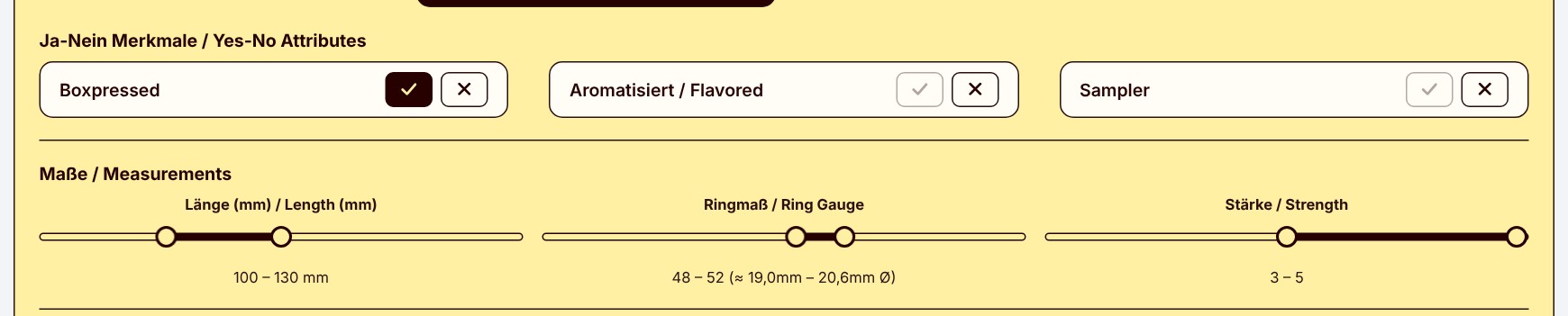
Yes-no attributes: For Boxpressed, Flavored and Sampler, each tile has two buttons, a tick for „yes“ and a cross for „no“. One click selects, a second click cancels the choice. Without a click the attribute does not matter to you.
The highlight: from–to sliders. With the three sliders for length, ring gauge and strength you narrow down a range. Drag the left and the right handle to the position you want; the chosen range is shown below.
- Length from 70 to 190 mm
- Ring gauge from 28 to 66, with the diameter in millimetres next to it (more on this below)
- Strength from 1 (mild) to 5 (strong)
In the picture, the tick is set for Boxpressed. The sliders are at length 100 to 130 mm, ring gauge 48 to 52 and strength 3 to 5.
Numbers and grey options: The number after an option shows how many cigars fit, given your current choice in the other fields. Options shown in grey would give no cigar together with your current choice. Both update immediately, even before you click „Anwenden / Apply“.
A note on this: several ✓ in the same field widen the choice, they exclude nothing. An option therefore only turns grey when it no longer fits your ×, „All ✓ together“ or your choice in other fields.
What is the ring gauge?
For those who are not yet familiar with the term „ring gauge“: it describes the diameter of a cigar in 64ths of an inch, so a ring gauge of 50 corresponds to a diameter of just under 20 millimetres. The higher the ring gauge, the thicker the cigar. Next to the slider we show you the matching diameter in millimetres.
Drag the two handles to the position you want, for example for a compact cigar between 100 and 130 mm in length with a ring gauge of 48 to 52.
How to use the filter
- Open our Cigars category.
- Click „Filter anzeigen“ (Show filters).
- Open the fields you want and mark every value with ✓ or ×. „Only these“ and „All ✓ together“ are at the top of the selection window.
- Set length, ring gauge and strength if you like and choose yes-no attributes.
- Click „Anwenden / Apply“. The list now shows only matching cigars.
- „Filter zurücksetzen / Reset“ takes you back to the full range.
On a smartphone, the „Anwenden / Apply“ button stays at the bottom of the screen.
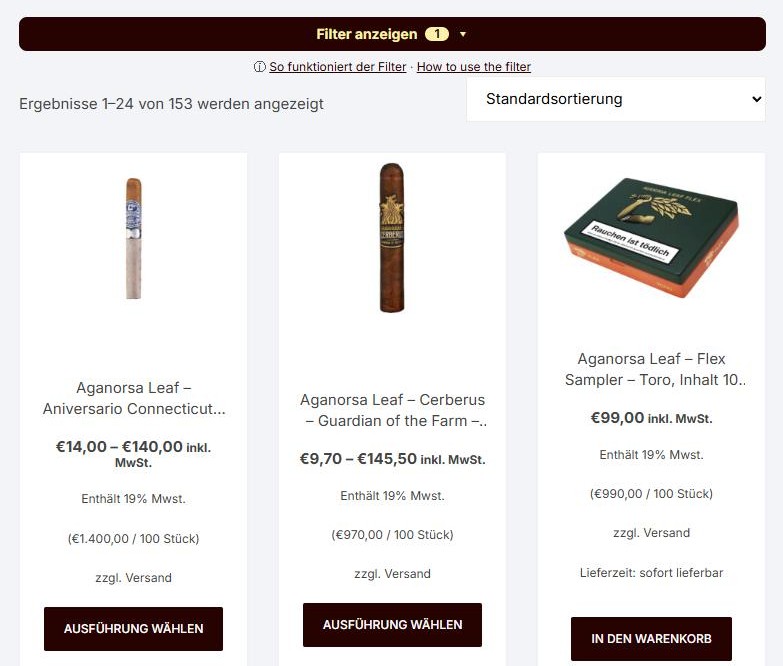
The picture shows the result for ✓ Nicaragua, ✓ Honduras and × Dominikanische Republik for the filler: 153 cigars. The number on the filter bar shows in how many fields you have marked something.
Five examples to try
| You are looking for | How to do it | Result (as of October 2026) |
|---|---|---|
| Cigars with filler only from Nicaragua, but no Ecuador wrapper | Filler country: ✓ Nicaragua, then „Only these“. Wrapper country: × Ecuador | 51 cigars |
| Filler with Criollo or Piloto, but without H-2000 | Filler variety: ✓ Criollo, ✓ Piloto, × H-2000 | 17 cigars |
| A Maduro or Colorado wrapper that is not Sun Grown | Wrapper characteristics: ✓ Maduro, ✓ Colorado, × Sun Grown | 86 cigars |
| A wrapper that is both Maduro and Sun Grown | Wrapper characteristics: ✓ Maduro, ✓ Sun Grown, „All ✓ together“ | 22 cigars |
| Cigars whose filler variety is unknown | Filler variety: ✓ Not specified | 151 cigars |
Enjoy exploring
Whether you are looking for a particular variety or want to discover new combinations: we hope the filter leads you to your next favourite cigar more quickly. And if you need advice, we are happy to help in our shop in Hamburg-Eimsbüttel.